


For years, one of the most common assumptions in a Salesforce implementation has been straightforward:
If you want to use Salesforce capabilities, you log in to Salesforce.
A sales representative opens Sales Cloud. A service representative works from the Service Console. An operations team uses a Salesforce application built for its process.
That model still works, and in many situations it remains the right model.
But enterprise technology has changed.
Employees no longer work in one application throughout the day. A relationship manager may spend most of the day inside a banking platform. A contact-center representative may work from a dedicated agent desktop. A field technician may depend on a purpose-built mobile application. Other teams may work primarily through Slack, Microsoft Teams, internal portals, mobile applications, or industry-specific systems.
Salesforce may contain the customer data, business processes, workflows, permissions, and automation behind many of these activities, but that does not necessarily mean Salesforce needs to be the screen through which every interaction happens.
This is where Salesforce Headless 360 becomes interesting.
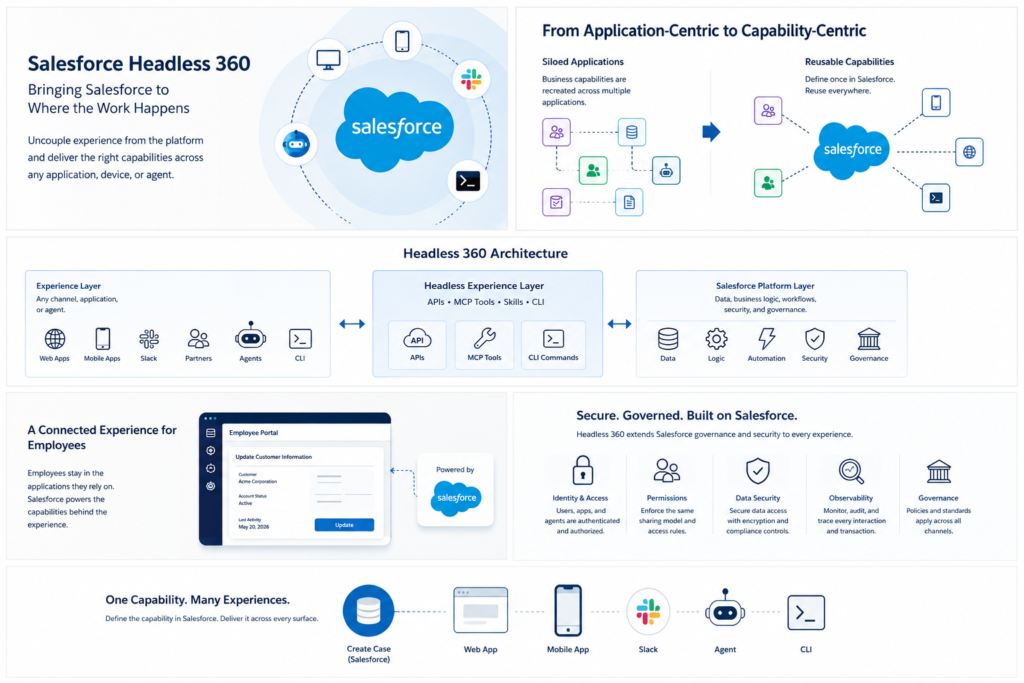
Salesforce describes Headless 360 as an architectural transformation that makes major Salesforce capabilities available through APIs, Model Context Protocol (MCP) tools, and CLI commands. Salesforce can therefore provide data, workflows, business logic, identity, permissions, and governance while experiences are delivered through other applications and surfaces.
The browser is no longer the only way to consume the platform.
And that changes how we should think about Salesforce architecture.
The Real Problem Is Not the Number of Applications
Most large organizations already operate multiple enterprise platforms.
That alone is not necessarily a problem.
The real problem begins when users have to understand those system boundaries in order to complete a business process.
Consider a relationship manager working for a bank.
The relationship manager starts the day in the bank’s relationship-management portal. The portal provides account information, portfolio details, documents, financial information, and other services needed to manage customers.
Salesforce is also part of the landscape.
It maintains customer relationships, activities, opportunities, service information, and other CRM processes.
Now imagine that during a customer conversation, the relationship manager needs to update an activity in Salesforce.
The process may look something like this:
Open the customer in the banking portal.
Move to Salesforce.
Search for the same customer again.
Open the appropriate Salesforce record.
Update the activity.
Return to the banking application.
Continue the customer conversation.
Nothing is technically broken.
But from the employee’s point of view, the architecture is creating unnecessary work.
The employee sees one customer.
The technology architecture sees two applications.
Headless 360 gives organizations another way to design this experience.
Instead of requiring the relationship manager to go to Salesforce, selected Salesforce capabilities can be made available through the application where the relationship manager is already working.
The banking portal remains the employee experience.
Salesforce remains the platform providing the business capability.
That distinction is important.
Headless 360 Is More Than Removing the Salesforce UI
Headless architecture itself is not a new concept.
Salesforce developers have been building external applications over Salesforce APIs for years. Salesforce itself notes that developers have already implemented headless patterns using approaches such as React front ends, Node.js applications over REST APIs, Experience Cloud scenarios, and mobile applications.
So what has changed?
The scope has become much broader.
Salesforce is positioning Headless 360 around making platform capabilities openly consumable through APIs, MCP tools, skills, and CLI commands by authenticated callers including applications, humans, developers, and agents.
That means the discussion is no longer only:
“How do I build a custom front end on Salesforce?”
The more interesting question is:
How do I make Salesforce business capabilities available wherever work actually happens?
That could be a web application.
It could be a mobile application.
It could be Slack.
It could be another enterprise platform.
And increasingly, it could also be an agent that needs to discover and execute Salesforce capabilities without navigating the traditional Salesforce interface. Salesforce specifically positions Headless 360 as part of its agentic enterprise architecture.
From Application-Centric Architecture to Capability-Centric Architecture
This is where Headless 360 can influence enterprise architecture.
Traditionally, organizations often think in terms of applications.
Salesforce owns this process.
The portal owns another process.
The mobile application owns something else.
Over time, each application begins accumulating its own version of similar business capabilities.
Customer lookup.
Case creation.
Eligibility validation.
Approval submission.
Account updates.
Order status.
Service history.
Authorization checks.
When another channel needs the same capability, development teams often recreate some portion of it.
Eventually, the organization may have multiple implementations of what is essentially the same business rule.
That becomes difficult to maintain.
Imagine a customer eligibility rule.
The rule exists in Salesforce.
Later, a digital team needs the same capability on the customer website, so part of the rule is recreated there.
A mobile team then implements another version.
An integration team introduces another variation for a partner application.
The business now has four implementations of one policy.
When the policy changes, every implementation has to change correctly and at the same time.
A headless architecture provides an opportunity to approach this differently.
Instead of asking each channel to own the business capability, Salesforce can continue to own the appropriate business logic while channels consume it.
Salesforce describes its Headless Experience Layer as separating business logic, data, and permissions from the screen.
That leads to a much cleaner architectural principle:
Define the capability where it belongs. Consume it where it is needed.
A Contact-Center Example
Consider another common scenario.
A company has invested heavily in its contact-center platform.
When a customer calls, the service representative works inside that platform because it provides telephony, call controls, knowledge, routing, customer context, and other capabilities required during the conversation.
Salesforce manages customer information and service processes.
During a call, the representative may need to:
identify the customer,
review previous cases,
create a service request,
update contact information,
add notes,
or check the status of an existing request.
One option is to make the service representative move repeatedly between the contact-center application and Salesforce.
Another option is to replace the existing contact-center experience.
Neither is automatically the best architectural decision.
With a headless approach, the existing contact-center application can remain the representative’s primary workspace while the appropriate Salesforce capabilities are consumed behind that experience.
The employee sees one continuous customer conversation.
The architecture may still involve several platforms, but those boundaries become less visible to the employee.
That is an important outcome.
Good enterprise architecture should not require users to understand the system landscape just to perform their job.
Salesforce Can Become the Capability Layer Behind the Experience
This also changes the role Salesforce can play in an enterprise.
Instead of thinking about Salesforce only as an application that employees log into, organizations can think about it as a platform that provides reusable business capabilities.
Salesforce may continue to own things such as:
customer data,
business processes,
workflow automation,
validation,
approvals,
sharing,
permissions,
and application logic.
But the experience consuming those capabilities does not necessarily have to live inside the traditional Salesforce user interface.
Salesforce describes Headless 360 as allowing organizations to deploy experiences across surfaces such as Slack, web, mobile, third-party applications, and agents while continuing to use Salesforce’s underlying data, logic, and governance.
This creates a useful separation.
Experience
Where does the user want to work?
Capability
What business action needs to happen?
System of record
Which platform should govern the information and transaction?
Those three questions no longer have to produce the same answer.
The Same Principle Applies to Customer Experiences
Consider a customer who wants to submit a service request.
The company already has a well-designed digital platform.
Customers use it to manage their accounts, download documents, make payments, update information, and interact with the company.
Salesforce manages service cases behind the scenes.
The organization now needs to decide how customers should create service requests.
One approach would be to move customers from the corporate website into a separate Salesforce experience.
Another would be to reproduce the entire Salesforce process in the digital platform.
A headless model offers another option.
The customer remains within the company’s existing digital experience.
The website collects the information.
The appropriate Salesforce capability processes the request.
Salesforce records and governs the resulting transaction.
When the customer returns later to check the status, the same website can present the updated information.
From the customer’s point of view, there is one company.
The customer does not need to know which enterprise system owns the process.
That is how the experience should work.
The Bigger Benefit Is Reuse
Many organizations have invested years building Salesforce capabilities.
The valuable part of that investment is not only the user interface.
It is everything underneath it.
The data model.
The business rules.
The workflows.
The permissions.
The approvals.
The integrations.
The Apex logic.
The automation.
The operating processes that have gradually become encoded in the platform.
When an organization builds another experience outside Salesforce, the first question should not automatically be:
“How do we rebuild this functionality?”
A better question is:
“Can we reuse the capability we already have?”
Salesforce’s current Headless 360 direction is built around exactly this idea of composability and reuse across different consumers and surfaces.
This is where the potential architectural value becomes significant.
A new channel does not necessarily require a new implementation of the underlying business process.
Security Cannot Become an Afterthought
There is an important caution here.
Headless does not mean unrestricted.
Once Salesforce capabilities can be consumed outside the Salesforce interface, identity and authorization become even more important.
An external application should not gain broader access simply because it is calling Salesforce through an API or another headless interface.
A user should still be able to perform only the actions they are authorized to perform.
An agent should not be able to bypass the permissions that govern the underlying business process.
A headless experience therefore needs to preserve the security boundary of the platform.
Salesforce explicitly positions identity, access and authorization, permissions, compliance, observability, governance, and secure data access as part of its Headless 360 architecture.
Salesforce’s developer guidance also makes an important architectural point: when the UI is no longer the primary control surface, organizations cannot depend on UI constraints to enforce governance. Security and integrity need to be enforced at the underlying platform and schema layers using mechanisms such as the sharing model, validation rules, and application logic where appropriate.
That may ultimately be one of the most important implications of Headless 360.
The Salesforce screen can become optional.
Salesforce governance cannot.
Headless 360 Also Changes the Agent Conversation
There is another reason Headless 360 matters now.
Agents do not interact with enterprise applications in the same way humans traditionally have.
A human can open Salesforce, navigate through several pages, interpret a screen, click a button, open another record, and continue the process.
An agent needs a programmatic capability it can discover and invoke.
Salesforce’s Headless 360 strategy is designed around this requirement.
Salesforce states that major platform capabilities can be exposed through APIs, MCP tools, and CLI commands so that authenticated agents and applications can interact with the platform directly.
This is one of the differences between Headless 360 and the headless architectures Salesforce customers may already have implemented.
The consumer is no longer necessarily another predetermined application.
It may be an agent deciding at runtime which approved capability it needs to execute.
That introduces different architecture considerations around authorization, observability, transaction integrity, and governance.
Salesforce’s own architecture guidance notes, for example, that existing integration patterns remain relevant, but agentic callers introduce additional implementation considerations because execution can be determined dynamically at runtime.
Imagine the Employee Portal of the Future
Consider an enterprise employee portal.
Today, employees may see links such as:
Open Salesforce.
Open HR.
Open the procurement system.
Open the service portal.
Open the finance system.
That is effectively an application directory.
Now imagine the portal being organized around what the employee wants to accomplish instead.
Request equipment.
Update customer information.
Submit an approval.
Check an opportunity.
Review a service issue.
Request access.
The employee chooses the task.
Behind the experience, the appropriate enterprise platform executes the capability.
Some transactions may be owned by Salesforce.
Others may belong to different systems.
The employee does not need to know.
This is the architectural direction that headless platforms make increasingly possible.
Users interact with business capabilities, not necessarily with individual applications.
Does This Mean Lightning Experience Goes Away?
No.
That would be the wrong conclusion.
There are many situations where Salesforce’s own user experience is exactly what an organization needs.
Sales users working deeply with opportunities, accounts, activities, forecasting, and pipeline management may benefit from the complete Salesforce experience.
Service representatives using Salesforce as their primary service platform may have no reason to introduce another front end.
Administrators, operations teams, and other users may continue working directly within Salesforce.
Headless 360 provides another architectural choice.
The decision does not have to be:
Salesforce UI or no Salesforce UI.
The better question is:
Which experience is appropriate for this user and this process?
In some cases, the answer will remain Lightning Experience.
In others, Salesforce may work primarily behind another experience.
And increasingly, the consumer may not be a traditional user interface at all.
Where This Becomes Strategically Important
The long-term value of Headless 360 is not simply that Salesforce can expose more APIs.
Salesforce has had extensive APIs for years.
The more important shift is that the platform is increasingly being designed around capabilities that can be consumed independently of the Salesforce screen.
Salesforce describes Headless 360 as part of an open and composable architecture in which Customer 360 provides business context, while capabilities can be used across different applications, agents, and experiences.
That has consequences for enterprise architecture.
It encourages organizations to think less about individual applications and more about reusable capabilities.
It encourages development teams to separate business logic from presentation.
It makes identity, permissions, and governance more important because business actions may originate from many different surfaces.
And it creates an opportunity to reduce the repeated implementation of the same business process across channels.
What Organizations Should Consider Before Adopting Headless 360
There is also a practical side to this discussion.
Headless 360 should not become a reason to redesign every Salesforce experience.
Organizations should first understand where the architecture creates meaningful value.
A useful starting point is to identify processes where:
users regularly move between Salesforce and another primary application,
the same Salesforce capability is being rebuilt across several channels,
a specialized user experience needs to be retained,
business logic needs to remain centrally governed,
or agents and external applications need controlled access to Salesforce capabilities.
From there, the architecture needs to consider identity, authorization, API contracts, transaction design, error handling, observability, business-rule enforcement, and governance.
It is also important to evaluate the maturity and availability of the specific Headless 360 capability being considered.
Headless 360 is a broader Salesforce architecture direction rather than one single technical component with one availability status. For example, Salesforce announced the Headless 360 MCP Server as Beta in July 2026, while other APIs and platform capabilities within the broader architecture have their own availability status.
Architecture decisions therefore need to be made at the capability level rather than based only on the Headless 360 label.
A Different Question for Salesforce Architects
For a long time, Salesforce architecture discussions have frequently started with a question such as:
“Should we build this inside Salesforce or outside Salesforce?”
Headless 360 gives us a more useful question:
“What should Salesforce own, and where should that capability be experienced?”
Salesforce may own the customer context.
Salesforce may own the workflow.
Salesforce may own the business rules.
Salesforce may own the authorization model.
Salesforce may own the transaction.
But the employee or customer may experience that capability through another application entirely.
That separation can create simpler employee journeys, more consistent business processes, greater reuse of existing Salesforce investment, and more flexibility in how organizations design digital experiences.
The important point is not that users should stop using Salesforce.
It is that they should not have to open Salesforce simply because Salesforce owns part of the process.
Sometimes the best Salesforce experience may be one where Salesforce is doing exactly what it should be doing in the background.
And the user can simply get the work done.

Leave a Reply